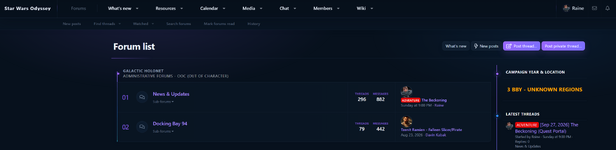
This update introduces a major visual and customisation refresh for Velqeris, with new branding controls and optional forum node animations.
New in this update:
New in this update:
- Added a new default Velqeris banner designed to match the style’s violet, navy and cyan colour palette.
- Added a new Velqeris desktop logo and dedicated mobile logo icon.
- Added Custom Branding controls under Velqeris Style Properties.
- Administrators can now upload and replace the desktop logo, mobile logo, desktop banner and optional mobile banner directly from the ACP.
- Custom uploaded logo branding is now the default branding mode using the bundled Velqeris assets.
- Mobile branding can use its own dedicated logo or fall back to the desktop logo.
- Mobile banners can use a separate asset or automatically reuse the desktop banner.
- Added banner positioning, sizing and overlay controls.
- Added a new Node Animation section to Style Properties.
- Added multiple optional node entrance effects including Fizzle, Fade In, Fade Up, Slide In, Scale In, Rail Sweep and Scan Reveal.
- Added animation speed, stagger and accent-flash controls.
- Node animations can be completely disabled using the Off option.
- Reduced-motion preferences are respected automatically.
- Updated compatibility metadata for XenForo 2.3.x, with a minimum requirement of XenForo 2.3.0+.
- Added new default Velqeris banner.
- Added new Velqeris desktop logo and mobile logo icon.
- Added ACP custom branding controls for desktop/mobile logos and banners.
- Added banner position, sizing and overlay options.
- Custom uploaded logo is now the default branding mode.
- Added optional Node Animations.
- Added Fizzle, Fade In, Fade Up, Slide In, Scale In, Rail Sweep and Scan Reveal effects.
- Added animation speed, stagger and accent-flash controls.
- Added an Off option to disable node animations completely.
- Added reduced-motion support.
- Updated compatibility to XenForo 2.3.x / 2.3.0+.