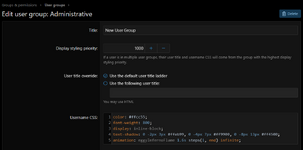
Give your XenForo user groups a blazing username effect featuring fiery orange, yellow and red colours with rapidly flickering flames and an intense burning glow.
Add the following to the bottom of your extra.less
Code:
@keyframes eggyInfernoFlame
{
    0%, 100%
    {
        color: #ffcc55;
        text-shadow:
            0 -2px 3px #ffeb99,
            0 -4px 7px #ff9900,
            0 -8px 13px #ff4500,
            0 -12px 20px #cc2200;
    }

    12%
    {
        color: #fff2a0;
        text-shadow:
            1px -3px 4px #ffffaa,
            -1px -6px 9px #ffaa00,
            2px -11px 16px #ff3300,
            0 -15px 23px #cc1100;
    }

    25%
    {
        color: #ff9900;
        text-shadow:
            -1px -2px 3px #ffcc00,
            2px -5px 8px #ff6600,
            -2px -9px 13px #ff2200;
    }

    38%
    {
        color: #ffe580;
        text-shadow:
            0 -3px 5px #ffff99,
            -2px -7px 11px #ff9900,
            2px -12px 19px #ff4400,
            0 -17px 25px #dd2200;
    }

    52%
    {
        color: #ffb020;
        text-shadow:
            1px -2px 4px #ffdd55,
            0 -5px 8px #ff7700,
            -1px -9px 15px #ff3300;
    }

    67%
    {
        color: #fff0a0;
        text-shadow:
            -1px -3px 5px #fff8bb,
            2px -7px 12px #ffaa00,
            -2px -13px 20px #ff3300,
            1px -18px 27px #cc1100;
    }

    83%
    {
        color: #ff8800;
        text-shadow:
            0 -2px 3px #ffcc33,
            1px -5px 9px #ff6600,
            -1px -10px 16px #ff2200;
    }
}
Then simply add the following CSS into the desired user group
Code:
color: #ffcc55;
font-weight: 800;
display: inline-block;
text-shadow: 0 -2px 3px #ffeb99, 0 -4px 7px #ff9900, 0 -8px 13px #ff4500;
animation: eggyInfernoFlame 1.6s steps(1, end) infinite;
So it looks like this