Eggy BNC now makes adding IRC networks easier with built-in network presets that automatically fill the correct server details for popular IRC networks.
Adding your first IRC network just got easier.
Eggy BNC now includes network presets inside the dashboard, allowing users to select common IRC networks from a simple dropdown instead of manually typing server details from scratch.
When adding a new IRC network, users can now choose from supported presets such as Libera.Chat, OFTC, DALnet, Undernet, QuakeNet, and IRCnet. Once selected, Eggy BNC automatically fills in the correct IRC server hostname and port details, making the setup process quicker, cleaner, and less error-prone.
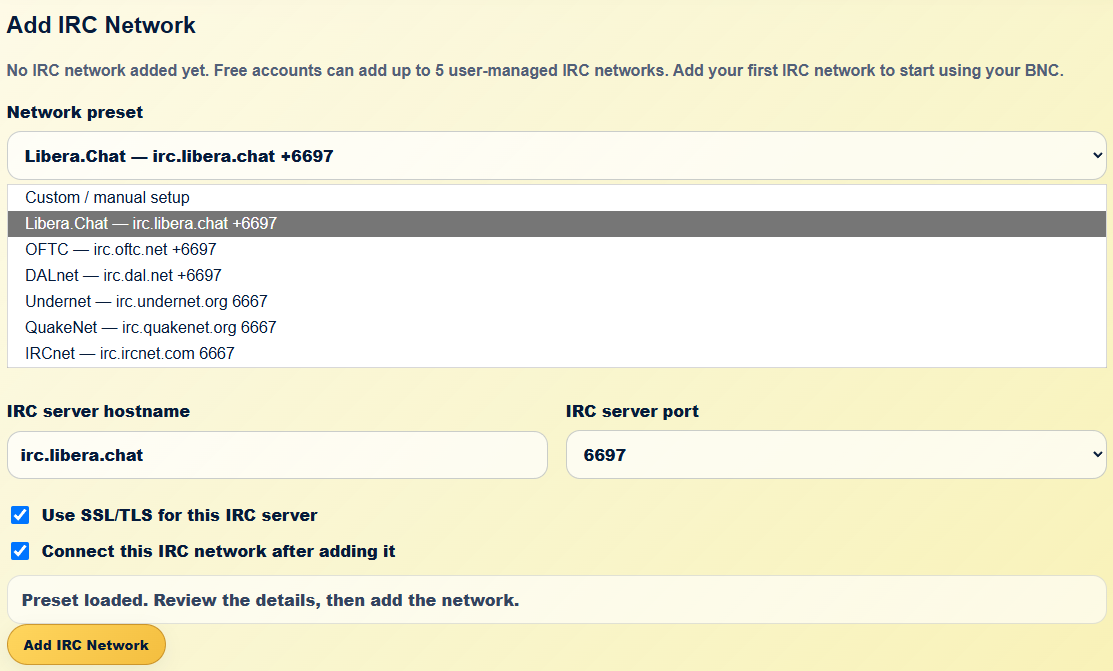
This upgrade is designed to help new users get connected faster while still keeping manual setup available for advanced users who want to connect to a custom IRC network.
The new flow keeps everything clear:
- choose a network preset
- review the hostname and port
- keep SSL/TLS enabled where supported
- decide whether to connect immediately after adding the network
- click Add IRC Network
For users who are new to IRC bouncers, this removes a lot of the guesswork. For experienced users, it saves time while still leaving full control available through the custom/manual setup option.
This also fits better with how Eggy BNC is meant to work: simple enough for a first-time user, but flexible enough for people who already know exactly where they want to connect.
The dashboard will continue improving around this kind of guided setup, making common tasks easier without taking control away from the user.
Eggy BNC: free, simple, and getting easier to use.